Using the Wallet Daemon
The Enjin Wallet Daemon is an outbound-only signer for Enjin Platform transactions. Your application creates transactions through the Enjin Platform API, the daemon polls for pending work, signs the encoded transactions with your wallet, and returns the signatures to the platform for broadcast.
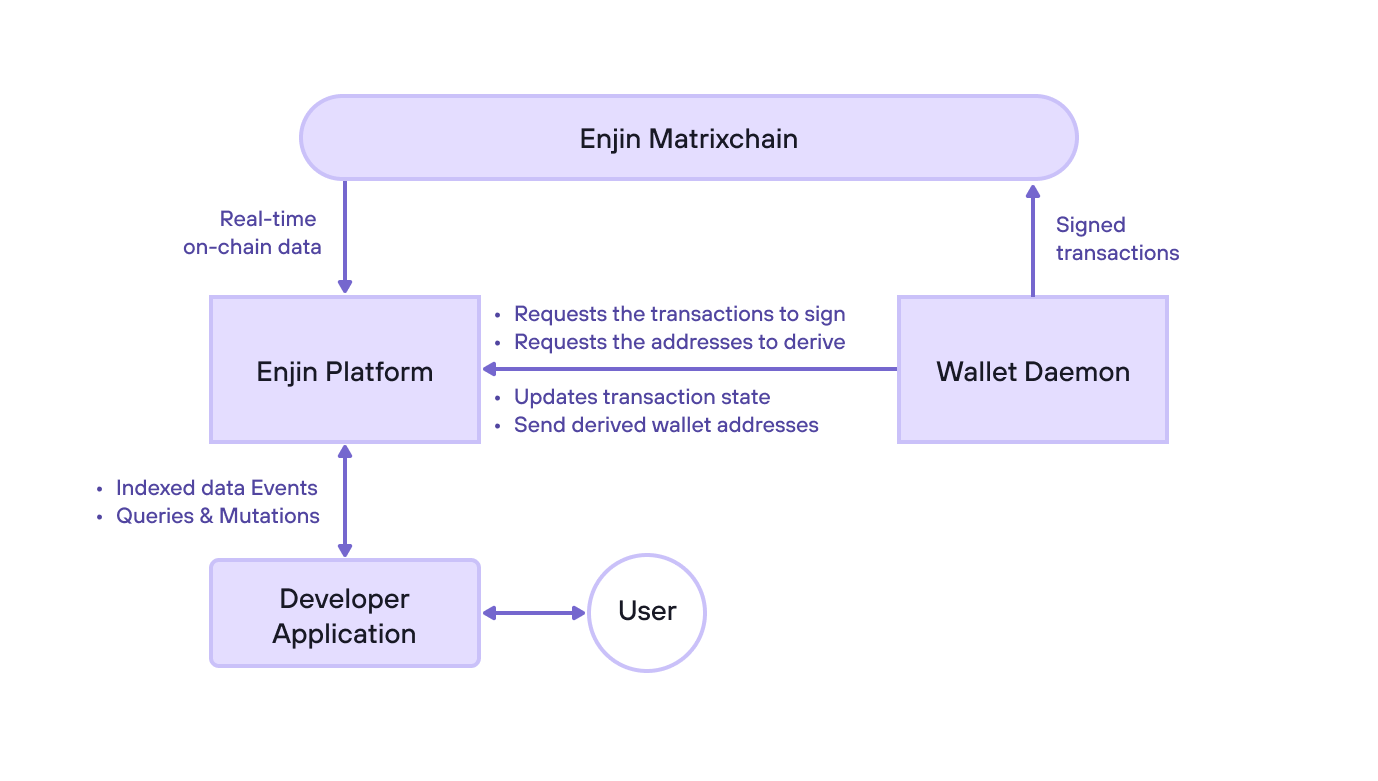
How the Wallet Daemon Works
- Send a mutation - Your application calls
CreateTransactionon the Enjin Platform API. The API encodes the corresponding extrinsic, stores it with aPENDINGstate, and returns a transactionuuid. - Poll for pending transactions - The wallet daemon repeatedly polls the Enjin Platform API. It does not need inbound network access, so the machine holding your Private Key should not expose public ports.
- Sign and broadcast - The daemon signs each pending transaction with your private key and sends the signed payload back to the platform.
- Confirm on-chain state - Enjin Platform monitors the chain and updates the transaction state when the extrinsic is included or finalized.
- Read the result - Poll
GetTransaction(uuid:)for the finalstateand theextrinsicobject (hash, on-chain outcome). To read emitted events, see Working with Events.
One daemon instance can sign for Enjin Matrixchain, Enjin Relaychain, Canary Matrixchain, and Canary Relaychain. Each network maps to a different SS58 address derived from the same wallet. The daemon prints these addresses when it starts.
Runtime Choices
Choose one of these deployment paths:
- AWS CloudFormation - recommended for the simplest hosted production deployment.
- Prebuilt binary - recommended when you already manage your own server.
- Docker - useful for containerized hosts or existing orchestration.
- Self-compile with Rust - useful for auditing, or unsupported platforms.
The same security principles apply to every path:
- Run exactly one daemon per Platform account.
- Multiple wallets can be derived and used for signing from the master key.
- Keep
wallet.seedandKEY_PASSbacked up separately. - Do not rotate
KEY_PASSfor an existingwallet.seed(changingKEY_PASSnot currently supported). - Do not expose inbound network access to the daemon host.
Required Values
| Value | Description |
|---|---|
PLATFORM_KEY | Enjin Platform API token. |
KEY_PASS | Password used to encrypt and decrypt wallet.seed. |
The encrypted wallet.seed file is not enough by itself. You also need the matching KEY_PASS. Losing either value can make the wallet unrecoverable.
KEY_PASSKEY_PASS protects the wallet seed at rest. Use a unique, high-entropy value and store it in a password manager or secret manager.
Download the Binary
Download the prebuilt daemon from https://enj.in/daemon, then extract it into a dedicated directory.
Copy the .env.example file to .env and fill in the required values:
KEY_PASSPLATFORM_KEY
Start the daemon:
./wallet-daemon
On Windows:
.\wallet-daemon.exe
On first run, the daemon generates a 12-word mnemonic and writes the encrypted seed to wallet.seed. It then prints the SS58 address for each supported network.
Docker
Run the published Docker image with a persistent seed directory:
docker run --name enjin-wallet-daemon \
  --detach \
  --restart unless-stopped \
  --env KEY_PASS=your-unique-key-password \
  --env PLATFORM_KEY=your-platform-api-token \
  --volume "$PWD:/wallet" \
  enjin/wallet-daemon:v3.0.6
Follow logs:
docker logs -f enjin-wallet-daemon
Update the container:
docker pull enjin/wallet-daemon:v3.0.6
docker stop enjin-wallet-daemon
docker rm enjin-wallet-daemon
Then run the container again with the same KEY_PASS.
AWS CloudFormation
AWS CloudFormation is the simplest production path for users who do not already manage infrastructure. The template creates an ECS Fargate service, encrypted EFS storage for wallet.seed, Secrets Manager secrets for KEY_PASS and PLATFORM_KEY, and CloudWatch Logs with 30 day retention.
The task runs in public subnets with a public IP so it can resolve and call the Enjin Platform Cloud service. Its security group has no inbound rules.
Deploy via the AWS Console
Launch the AWS CloudFormation stack
The quick link pre-fills the Docker image but does not pre-fill the API token. Enter your Enjin Platform API token in the CloudFormation console.
Deploy with the AWS CLI
read -rsp "Enjin Platform API token: " PLATFORM_TOKEN
printf "\n"

aws cloudformation create-stack \
  --stack-name EnjinWalletDaemon \
  --template-url "https://enjin-iac-templates.s3.us-east-2.amazonaws.com/wallet-daemon.yml" \
  --capabilities CAPABILITY_IAM \
  --parameters \
    ParameterKey=PlatformApiToken,ParameterValue="$PLATFORM_TOKEN" \
    ParameterKey=WalletDaemonImage,ParameterValue=enjin/wallet-daemon:v3.0.6

unset PLATFORM_TOKEN
Wait for the stack:
aws cloudformation wait stack-create-complete --stack-name EnjinWalletDaemon
Open the CloudWatchLogsUrl stack output and find the daemon startup logs. The first run creates wallet.seed and prints the public wallet addresses.
aws cloudformation describe-stacks \
  --stack-name EnjinWalletDaemon \
  --query "Stacks[0].Outputs[?OutputKey=='CloudWatchLogsUrl'].OutputValue" \
  --output text
Self-Compile with Rust
Install the Rust toolchain, clone the repository, and build the release binary:
git clone https://github.com/enjin/wallet-daemon.git
cd wallet-daemon
cargo build --release
The compiled binary is written to:
target/release/wallet-daemon
Create a .env file as shown in Download the Binary, then run:
./target/release/wallet-daemon
Importing an Existing Seed
The daemon can import an existing 12-word mnemonic and encrypt it into wallet.seed with your KEY_PASS.
Stop the daemon first, make sure KEY_PASS, PLATFORM_KEY, and SEED_PATH are configured, then run:
./wallet-daemon import
The command prompts for the mnemonic and writes the encrypted seed file. Start the daemon normally after import.
Recovering the Mnemonic
If you need to migrate to a wallet app, the daemon can print the decrypted seed. Run this only from a trusted shell:
./wallet-daemon print-seed
Updating
- AWS - update the
WalletDaemonImageparameter to a new versioned image tag. - Binary - download a newer release from https://enj.in/daemon, replace the binary, and keep the same
.envandwallet.seedfile. - Docker - pull a newer versioned image tag and restart the container with the same volume and
KEY_PASS. - Self-compiled - pull the latest repository changes, rebuild with
cargo build --release, and restart the daemon.