Adding Metadata
Adding Metadata
to a token enables games and apps to import detailed information and showcase your token's data. Usually, digital assets are identified just by its Token ID. Metadata adds extra details to these assets, giving them properties such as a title, a narrative, and visuals.- Some Enjin Coin on Enjin Matrixchain to pay for Transaction Fees and metadata Storage Deposits. You can obtain cENJ (Canary ENJ) for testing from the built-in Canary faucet in the Platform UI.
- An Enjin Platform Account.
- A Collection and a Token to add metadata to.
- Follow our Best Practices for Collection/Token Metadata.
You can even use metadata to attach gifs, videos, and 3D models to your token. This data can be stored both on-chain and off-chain to allow users and other supported platforms to access the information.
When storing data on-chain, metadata can be defined as attributes such as name, description, fallback image, and any other attribute you choose. However, if the data is stored off-chain, it should always reference a centralized public repository through a .json file.
Metadata Storage
There are three main ways to store metadata for your tokens:
-
On-Chain Storage: Attributes
- Storing metadata directly on the blockchain is known as on-chain storage.
- It's immutable and highly secure since it's protected by the Enjin Blockchain's decentralized nature.
- On-chain storage can cost a small fee at the time of mint and has slight limitations in terms of space, making it suitable for smaller, permanent files.
-
Off-Chain Storage: JSON
- This means the metadata is stored outside the blockchain on a separate server or database.
- It's often accessible through a URL, typically pointing to a JSON file containing the asset's information.
- Off-chain storage is cheaper and more flexible for large or frequently updated data, but it relies on external servers' availability and security.
-
InterPlanetary File System (IPFS): JSON
- IPFS is a decentralized storage solution that distributes file storage across a network of computers.
- It allows metadata to be stored off the main blockchain but in a way that's still decentralized, tamper-proof, and permanent.
- IPFS assigns a unique hash to each file. When you store metadata on IPFS, you link to it using this hash, ensuring the data remains unchanged.
Each option has trade-offs between cost, reliability, and security, and the choice depends on the specific needs and goals of the digital asset being created.
Attributes: OnChain Metadata
You can assign multiple on-chain attributes to a token simultaneously, which allows you to define the metadata of the token.
Some commonly recognized attributes, following the Universal Metadata Standard, include:
name: The title of the token.description: A brief explanation or description of the token.media: A token image, GIF, or MP4 to represent the token.URI: The web address (URL) where the JSON file containing the token's off-chain or IPFS metadata is hosted.
Check the Best Practices for Collection/Token Metadata, and the Universal Metadata Standard.
The process of adding attributes is similar for both collections and tokens.
While this tutorial guides you through adding an attribute to a token, you can follow the same steps to add attributes to a collection.
Simply navigate to the corresponding menu for collections instead of tokens — and on the API, use the batchSetCollectionAttribute action (described below) in place of batchSetTokenAttribute.
Ensure you use the correct casing when defining attributes to avoid errors.
There are two ways to add metadata:
Option A. Using the Enjin Dashboard
Locate the token in the dashboard, click the 3 vertical dots (⋮), then click "Set Attribute".
The Set Attribute form has a + Add to Batch button — queue several attributes and submit them as a single batched transaction. See Batching transactions for the full flow.
Type in the "Key" that you wish to add, and its "Value" in the corresponding text fields.
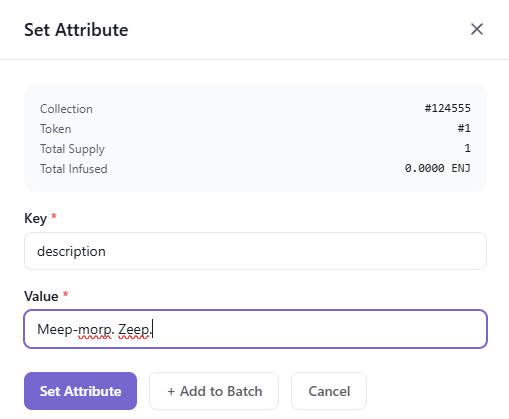
Once you're satisfied with the options, click the "Set Attribute" button to submit the request. A Transaction Submitted modal appears with the new transaction's UUID and a View Transaction button that opens its row on the Transactions page.
Since this request requires a Transaction
, it must be signed before it broadcasts.- By default, transactions are signed automatically by the Wallet Daemon.
- To sign with a different account, expand Transaction Options → Signing Account on the form and provide a Managed Wallet address.
Option B. Using the Enjin API & SDKs
Batched attributes are split into two discriminator actions on CreateTransaction:
batchSetTokenAttribute— sets multiple attributes on a single token (collectionId,tokenId,attributes).batchSetCollectionAttribute— sets multiple attributes on a collection (id,attributes).
The example below sets three attributes on a token. To target the collection itself, swap batchSetTokenAttribute for batchSetCollectionAttribute and replace the collectionId / tokenId pair with a single id field equal to the collection ID.
The C++ examples on this page target an older version of the Enjin Platform and won't work against the current API. An updated C++ SDK is on the way — for now, use the C# SDK or the GraphQL examples.
- GraphQL
- cURL
- c# SDK
- C++ SDK
- Javascript
- Node.js
- Python
mutation BatchSetTokenAttribute {
  CreateTransaction(
    network: ENJIN  # or CANARY for testnet
    chain: MATRIX
    transaction: {
      batchSetTokenAttribute: {
        collectionId: 36105
        tokenId: 0
        attributes: [
          { key: "name", value: "Chronicles of the Celestium" }
          {
            key: "description"
            value: "An epic saga where players assume the roles of intrepid tradesmiths, shaping destinies with fire and will across the star-woven expanses of the multiverse."
          }
          { key: "uri", value: "https://yourhost/metadata.json" }
        ]
      }
    }
  ) {
    uuid
    action
    state
  }
}
curl --location 'https://platform.enjin.io/graphql' \
-H 'Content-Type: application/json' \
-H 'Authorization: Bearer YOUR_API_TOKEN' \
-d '{"query":"mutation BatchSetTokenAttribute($collectionId: BigInt!, $tokenId: BigInt!, $attributes: [AttributeInput!]!) {\r\n  CreateTransaction(\r\n    network: ENJIN\r\n    chain: MATRIX\r\n    transaction: {\r\n      batchSetTokenAttribute: {\r\n        collectionId: $collectionId\r\n        tokenId: $tokenId\r\n        attributes: $attributes\r\n      }\r\n    }\r\n  ) {\r\n    uuid\r\n    action\r\n    state\r\n  }\r\n}","variables":{"collectionId":36105,"tokenId":0,"attributes":[{"key":"name","value":"Chronicles of the Celestium"},{"key":"description","value":"An epic saga where players assume the roles of intrepid tradesmiths, shaping destinies with fire and will across the star-woven expanses of the multiverse."},{"key":"uri","value":"https://yourhost/metadata.json"}]}}'
using System;
using System.Collections.Generic;
using Enjin.Platform.Sdk;

// Create and authenticate the client
using var client = new PlatformClient();
client.Auth("<your-platform-token>");

// Build the CreateTransaction mutation (one action set on TransactionInput)
var mutation = new MutationQueryBuilder()
    .WithCreateTransaction(
        new TransactionQueryBuilder().WithUuid().WithState(),
        network: Network.Enjin, // or Network.Canary for testnet — match the GraphQL tab
        chain: Chain.Matrix,
        transaction: new TransactionInput
        {
            // To target the collection itself, use BatchSetCollectionAttribute
            // with an Id instead (omit TokenId).
            BatchSetTokenAttribute = new BatchSetTokenAttributeInput
            {
                CollectionId = 36105,
                TokenId = 0,
                Attributes = new List<AttributeInput>
                {
                    new AttributeInput { Key = "name", Value = "Chronicles of the Celestium" },
                    new AttributeInput
                    {
                        Key = "description",
                        Value = "An epic saga where players assume the roles of intrepid tradesmiths, shaping destinies with fire and will across the star-woven expanses of the multiverse.",
                    },
                    new AttributeInput { Key = "uri", Value = "https://yourhost/metadata.json" },
                },
            },
        });

// Send the mutation; poll GetTransaction by uuid to track its on-chain state
var response = await client.SendMutation(mutation);
Console.WriteLine(response.Result.Data?.CreateTransaction?.Uuid);
#include "EnjinPlatformSdk/CoreMutations.hpp"
#include <iostream>

using namespace enjin::platform::sdk;
using namespace std;

int main() {

    //Define attributes to set
    vector<AttributeInput> vectorAttributes;
    AttributeInput nameAttribute1 = AttributeInput()
            .SetKey(make_shared<SerializableString>("name"))
            .SetValue(make_shared<SerializableString>("Chronicles of the Celestium"));

    AttributeInput nameAttribute2 = AttributeInput()
            .SetKey(make_shared<SerializableString>("description"))
            .SetValue(make_shared<SerializableString>("An epic saga where players assume the roles of intrepid tradesmiths, shaping destinies with fire and will across the star-woven expanses of the multiverse."));

    AttributeInput nameAttribute3 = AttributeInput()
            .SetKey(make_shared<SerializableString>("uri"))
            .SetValue(make_shared<SerializableString>("https://yourhost/metadata.json"));

    vectorAttributes.push_back(nameAttribute1);
    vectorAttributes.push_back(nameAttribute2);
    vectorAttributes.push_back(nameAttribute3);

    shared_ptr<SerializableArray<AttributeInput>> attributes = make_shared<SerializableArray<AttributeInput>>(vectorAttributes);

    // Setup mutation data
    shared_ptr tokenId = make_shared<EncodableTokenIdInput>();
    tokenId->SetInteger(make_shared<SerializableString>("0"));

    // Setup mutation
    BatchSetAttribute batchSetAttribute = BatchSetAttribute();
    batchSetAttribute
        .SetCollectionId(make_shared<SerializableString>("2406"))
        .SetTokenId(tokenId)
        .SetAttributes(attributes);

    // Define and assign the return data fragment to the mutation
    shared_ptr<TransactionFragment> transactionFragment = make_shared<TransactionFragment>();
    transactionFragment
        ->WithId()
        .WithMethod()
        .WithState();

    batchSetAttribute.SetFragment(transactionFragment);

    // Create and auth a client to send the request to the platform
    unique_ptr<PlatformClient> client = PlatformClient::Builder()
            .SetBaseAddress("https://platform.enjin.io")
            .Build();
    client->Auth("Your_Platform_Token_Here");

    // Send the request then get the response and write the output to the console.
    // Only the fields that were requested in the fragment will be filled in,
    // other fields which weren't requested in the fragment will be set to null.
    future<shared_ptr<IPlatformResponse<GraphQlResponse<Transaction>>>> futureResponse = SendBatchSetAttribute(*client, batchSetAttribute);

    // Get the platform response holding the HTTP data
    PlatformResponsePtr<GraphQlResponse<Transaction>> response = futureResponse.get();

    // Get the result, a GraphQL response, holding the GraphQL data
    const optional<GraphQlResponse<Transaction>>& gqlResult = response->GetResult();

    // Write the result data to the console
    if (gqlResult.has_value() && gqlResult->IsSuccess())
    {
        const optional<Transaction>& transaction = gqlResult->GetData()->GetResult();

        std::cout << to_string(transaction->GetId().value()) << std::endl;
        std::cout << ToString(transaction->GetMethod().value()) << std::endl;
    }

    // Write any error messages to the console
    if (gqlResult.has_value() && gqlResult->HasErrors())
    {
        const optional<vector<GraphQlError>>& errors = gqlResult->GetErrors();

        for (const GraphQlError& error : errors.value()) {
            std::cout << error.GetMessage().value() << std::endl;
        }
    }

    client.reset();

    return 0;
}
fetch('https://platform.enjin.io/graphql', {
  method: 'POST',
  headers: {'Content-Type': 'application/json','Authorization': 'Bearer YOUR_API_TOKEN'},
  body: JSON.stringify({
    query: `
      mutation BatchSetTokenAttribute($collectionId: BigInt!, $tokenId: BigInt!, $attributes: [AttributeInput!]!) {
        CreateTransaction(
          network: ENJIN
          chain: MATRIX
          transaction: {
            batchSetTokenAttribute: {
              collectionId: $collectionId
              tokenId: $tokenId
              attributes: $attributes
            }
          }
        ) {
          uuid
          action
          state
        }
      }
    `,
    variables: {
      collectionId: 36105,
      tokenId: 0,
      attributes: [
        { key: "name", value: "Chronicles of the Celestium" },
        { key: "description", value: "An epic saga where players assume the roles of intrepid tradesmiths, shaping destinies with fire and will across the star-woven expanses of the multiverse." },
        { key: "uri", value: "https://yourhost/metadata.json" }
      ]
    }
  }),
})
.then(response => response.json())
.then(data => console.log(data));
const axios = require('axios');

axios.post('https://platform.enjin.io/graphql', {
  query: `
    mutation BatchSetTokenAttribute($collectionId: BigInt!, $tokenId: BigInt!, $attributes: [AttributeInput!]!) {
      CreateTransaction(
        network: ENJIN
        chain: MATRIX
        transaction: {
          batchSetTokenAttribute: {
            collectionId: $collectionId
            tokenId: $tokenId
            attributes: $attributes
          }
        }
      ) {
        uuid
        action
        state
      }
    }
  `,
  variables: {
    collectionId: 36105,
    tokenId: 0,
    attributes: [
      { key: "name", value: "Chronicles of the Celestium" },
      { key: "description", value: "An epic saga where players assume the roles of intrepid tradesmiths, shaping destinies with fire and will across the star-woven expanses of the multiverse." },
      { key: "uri", value: "https://yourhost/metadata.json" }
    ]
  }
}, {
  headers: { 'Content-Type': 'application/json', 'Authorization': 'Bearer YOUR_API_TOKEN' }
})
.then(response => console.log(response.data))
.catch(error => console.error(error));
import requests

query = '''
mutation BatchSetTokenAttribute($collectionId: BigInt!, $tokenId: BigInt!, $attributes: [AttributeInput!]!) {
  CreateTransaction(
    network: ENJIN
    chain: MATRIX
    transaction: {
      batchSetTokenAttribute: {
        collectionId: $collectionId
        tokenId: $tokenId
        attributes: $attributes
      }
    }
  ) {
    uuid
    action
    state
  }
}
'''

variables = {
  'collectionId': 36105,
  'tokenId': 0,
  'attributes': [
    {'key': 'name', 'value': 'Chronicles of the Celestium'},
    {'key': 'description', 'value': 'An epic saga where players assume the roles of intrepid tradesmiths, shaping destinies with fire and will across the star-woven expanses of the multiverse.'},
    {'key': 'uri', 'value': 'https://yourhost/metadata.json'},
  ],
}

response = requests.post('https://platform.enjin.io/graphql',
	json={'query': query, 'variables': variables},
	headers={'Content-Type': 'application/json', 'Authorization': 'Bearer YOUR_API_TOKEN'}
)
print(response.json())
The response includes the transaction's uuid, action (e.g. MultiTokens.batch_set_attribute), and state (PENDING → BROADCAST → FINALIZED). Use GetTransaction(network, chain, uuid: "<returned-uuid>") to poll the current state.
Once it reaches FINALIZED, an event is emitted for each attribute set, confirming the change. See Working with Events for how to read them.
Use setTokenAttribute / setCollectionAttribute to write a single key, removeTokenAttribute / removeCollectionAttribute to remove one, and removeAllTokenAttributes / removeAllCollectionAttributes to wipe everything. All of these are discriminator fields on CreateTransaction.transaction.
JSON File: Off-Chain & IPFS Metadata
A JSON file can be used to provide comprehensive information about the asset, including its description, visual representation, multimedia attachments, external references, categorization, associated files, and specific attributes.
Take a look at this simple JSON schema (following the Universal Metadata Standard) to learn how to properly format the off-chain metadata for your NFT.
{
   "name": "Starforged Cleaver",
   "description": "A blade smithed from cosmic steel, its edge sharp enough to slice through the fabric of reality itself.",
   "external_url": "https://enjin.io",
   "fallback_image": "https://yourhost/image.jpg",
   "media": [
      {
         "type": "image/png",
         "url": "https://yourhost/image.jpg"
      }
   ],
   "attributes": {
      "Strength": {
         "value": "800"
      }
   }
}
Take note of these data points:
-
description: This field provides a human-readable description of the asset. It's a text description that helps users understand the nature or significance of the asset. -
media: Themediafield contains a URL pointing to an image representation of the asset. It supports PNG, GIF, and JPG file formats. -
external_url: The "external_url" field is a URL pointing to an external application or website where users can view additional information or interact with the asset. -
attributes: This is an object array where each object should contain antitleandvaluefields. The attributetitledefines the type of trait or attribute associated with the asset, whilevaluecan be a string or a number, representing the value of that trait or attribute.
You can also host your JSON files on IPFS, to make your metadata more immutable.
Check the Best Practices for Collection/Token Metadata, and the Universal Metadata Standard.
For a comprehensive view of all available arguments for queries and mutations, please refer to our API Reference. This resource will guide you on how to use the GraphiQL Playground to explore the full structure and functionality of our API.
To sign with a managed wallet instead of the Wallet Daemon, set signerAddress on CreateTransaction.
To mint some token supply, head to the Minting Tokens tutorial.