Transferring Tokens
You will need to transfer tokens for:
- Implementing various gameplay features such as gifting, trading, and rewards.
- Supporting secure and efficient token transactions.
- Providing a seamless user experience by allowing token transfers without leaving the game environment.
- Some Enjin Coin on Enjin Matrixchain to pay for Transaction Fees and a deposit of 0.01 ENJ is required for the Token Account Deposit, for each new token holder. You can obtain cENJ (Canary ENJ) for testing from the built-in Canary faucet in the Platform UI.
- An Enjin Platform Account.
- A Collection and a Token to mint.
There are two ways to transfer a token:
Option A. Using the Enjin Dashboard
Locate the token in the dashboard, click the 3 vertical dots (⋮), then click "Transfer".
The Transfer form has a + Add to Batch button — queue several transfers and submit them as a single batched transaction. See Batching transactions for the full flow.
Fill in the recipient and amount in the corresponding fields.
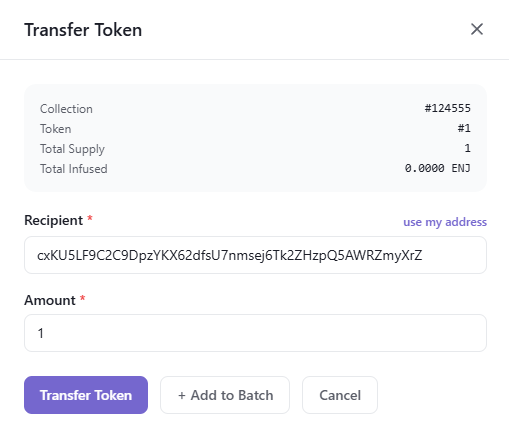
Once you're satisfied with the options, click the "Transfer" button to submit the request. A Transaction Submitted modal appears with the new transaction's UUID and a View Transaction button that opens its row on the Transactions page.
Since this request requires a Transaction
, it must be signed before it broadcasts.- By default, transactions are signed automatically by the Wallet Daemon.
- To sign with a different account, expand Transaction Options → Signing Account on the form and provide a Managed Wallet address.
Option B. Using the Enjin API & SDKs
Transfers are split into three discriminator actions on CreateTransaction:
transferToken— transfer a specific token between accounts.transferEnj— transfer ENJ (or cENJ on Canary) between accounts.batchTransfer— transfer multiple tokens from one collection to multiple recipients in a single transaction.
The C++ examples on this page target an older version of the Enjin Platform and won't work against the current API. An updated C++ SDK is on the way — for now, use the C# SDK or the GraphQL examples.
Transferring an asset
Use the transferToken action to move a specific token from the signing account to another wallet.
- GraphQL
- cURL
- c# SDK
- C++ SDK
- Javascript
- Node.js
- Python
mutation TransferToken {
  CreateTransaction(
    network: ENJIN  # or CANARY for testnet
    chain: MATRIX
    transaction: {
      transferToken: {
        recipient: "cxLU94nRz1en6gHnXnYPyTdtcZZ9dqBasexvexjArj4V1Qr8f"
        collectionId: 36105
        tokenId: 0
        amount: 1
      }
    }
  ) {
    uuid
    action
    state
  }
}
curl --location 'https://platform.enjin.io/graphql' \
-H 'Content-Type: application/json' \
-H 'Authorization: Bearer YOUR_API_TOKEN' \
-d '{"query":"mutation TransferToken($recipient: String!, $collectionId: BigInt!, $tokenId: BigInt!, $amount: BigInt!) {\r\n  CreateTransaction(\r\n    network: ENJIN\r\n    chain: MATRIX\r\n    transaction: {\r\n      transferToken: {\r\n        recipient: $recipient\r\n        collectionId: $collectionId\r\n        tokenId: $tokenId\r\n        amount: $amount\r\n      }\r\n    }\r\n  ) {\r\n    uuid\r\n    action\r\n    state\r\n  }\r\n}","variables":{"recipient":"cxLU94nRz1en6gHnXnYPyTdtcZZ9dqBasexvexjArj4V1Qr8f","collectionId":36105,"tokenId":0,"amount":1}}'
using System;
using Enjin.Platform.Sdk;

// Create and authenticate the client
using var client = new PlatformClient();
client.Auth("<your-platform-token>");

// Build the CreateTransaction mutation (transferToken action on TransactionInput)
var mutation = new MutationQueryBuilder()
    .WithCreateTransaction(
        new TransactionQueryBuilder().WithUuid().WithState(),
        network: Network.Enjin, // or Network.Canary for testnet
        chain: Chain.Matrix,
        transaction: new TransactionInput
        {
            TransferToken = new TransferTokenInput
            {
                Recipient = "cxLU94nRz1en6gHnXnYPyTdtcZZ9dqBasexvexjArj4V1Qr8f",
                CollectionId = 36105,
                TokenId = 0,
                Amount = 1,
            },
        });

var response = await client.SendMutation(mutation);
Console.WriteLine(response.Result.Data?.CreateTransaction?.Uuid);
#include "EnjinPlatformSdk/CoreMutations.hpp"
#include <iostream>

using namespace enjin::platform::sdk;
using namespace std;

int main() {

    // Define the simple transfer params
    shared_ptr tokenId = make_shared<EncodableTokenIdInput>();
    tokenId->SetInteger(make_shared<SerializableString>("0"));

    SimpleTransferParams simpleTransferParams = SimpleTransferParams()
            .SetAmount(make_shared<SerializableString>("1"))
            .SetTokenId(tokenId);

    // Setup mutation
    SimpleTransferToken simpleTransferToken = SimpleTransferToken()
            .SetRecipient(make_shared<SerializableString>("cxLU94nRz1en6gHnXnYPyTdtcZZ9dqBasexvexjArj4V1Qr8f"))
            .SetCollectionId(make_shared<SerializableString>("36105"))
            .SetParams(make_shared<SimpleTransferParams>(simpleTransferParams));

    // Define and assign the return data fragment to the mutation
    shared_ptr<TransactionFragment> transactionFragment = make_shared<TransactionFragment>();
    transactionFragment
        ->WithId()
        .WithMethod()
        .WithState();

    simpleTransferToken.SetFragment(transactionFragment);

    // Create and auth a client to send the request to the platform
    unique_ptr<PlatformClient> client = PlatformClient::Builder()
            .SetBaseAddress("https://platform.enjin.io")
            .Build();
    client->Auth("Your_Platform_Token_Here");

    // Send the request then get the response and write the output to the console.
    // Only the fields that were requested in the fragment will be filled in,
    // other fields which weren't requested in the fragment will be set to null.
    future<shared_ptr<IPlatformResponse<GraphQlResponse<Transaction>>>> futureResponse = SendSimpleTransferToken(*client, simpleTransferToken);

    // Get the platform response holding the HTTP data
    PlatformResponsePtr<GraphQlResponse<Transaction>> response = futureResponse.get();

    // Get the result, a GraphQL response, holding the GraphQL data
    const optional<GraphQlResponse<Transaction>>& gqlResult = response->GetResult();

    // Write the result data to the console
    if (gqlResult.has_value() && gqlResult->IsSuccess())
    {
        const optional<Transaction>& transaction = gqlResult->GetData()->GetResult();

        std::cout << to_string(transaction->GetId().value()) << std::endl;
        std::cout << ToString(transaction->GetMethod().value()) << std::endl;
    }

    // Write any error messages to the console
    if (gqlResult.has_value() && gqlResult->HasErrors())
    {
        const optional<vector<GraphQlError>>& errors = gqlResult->GetErrors();

        for (const GraphQlError& error : errors.value()) {
            std::cout << error.GetMessage().value() << std::endl;
        }
    }

    client.reset();

    return 0;
}
fetch('https://platform.enjin.io/graphql', {
  method: 'POST',
  headers: {'Content-Type': 'application/json','Authorization': 'Bearer YOUR_API_TOKEN'},
  body: JSON.stringify({
    query: `
      mutation TransferToken($recipient: String!, $collectionId: BigInt!, $tokenId: BigInt!, $amount: BigInt!) {
        CreateTransaction(
          network: ENJIN
          chain: MATRIX
          transaction: {
            transferToken: {
              recipient: $recipient
              collectionId: $collectionId
              tokenId: $tokenId
              amount: $amount
            }
          }
        ) {
          uuid
          action
          state
        }
      }
    `,
    variables: {
      recipient: "cxLU94nRz1en6gHnXnYPyTdtcZZ9dqBasexvexjArj4V1Qr8f",
      collectionId: 36105,
      tokenId: 0,
      amount: 1
    }
  }),
})
.then(response => response.json())
.then(data => console.log(data));
const axios = require('axios');

axios.post('https://platform.enjin.io/graphql', {
  query: `
    mutation TransferToken($recipient: String!, $collectionId: BigInt!, $tokenId: BigInt!, $amount: BigInt!) {
      CreateTransaction(
        network: ENJIN
        chain: MATRIX
        transaction: {
          transferToken: {
            recipient: $recipient
            collectionId: $collectionId
            tokenId: $tokenId
            amount: $amount
          }
        }
      ) {
        uuid
        action
        state
      }
    }
  `,
  variables: {
    recipient: "cxLU94nRz1en6gHnXnYPyTdtcZZ9dqBasexvexjArj4V1Qr8f",
    collectionId: 36105,
    tokenId: 0,
    amount: 1
  }
}, {
  headers: {'Content-Type': 'application/json','Authorization': 'Bearer YOUR_API_TOKEN'}
})
.then(response => console.log(response.data))
.catch(error => console.error(error));
import requests

query = '''
mutation TransferToken($recipient: String!, $collectionId: BigInt!, $tokenId: BigInt!, $amount: BigInt!) {
  CreateTransaction(
    network: ENJIN
    chain: MATRIX
    transaction: {
      transferToken: {
        recipient: $recipient
        collectionId: $collectionId
        tokenId: $tokenId
        amount: $amount
      }
    }
  ) {
    uuid
    action
    state
  }
}
'''

variables = {
  'recipient': 'cxLU94nRz1en6gHnXnYPyTdtcZZ9dqBasexvexjArj4V1Qr8f',
  'collectionId': 36105,
  'tokenId': 0,
  'amount': 1,
}

response = requests.post('https://platform.enjin.io/graphql',
  json={'query': query, 'variables': variables},
  headers={'Content-Type': 'application/json', 'Authorization': 'Bearer YOUR_API_TOKEN'}
)
print(response.json())
Transferring ENJ token
To send ENJ (or cENJ on the Canary network) from one wallet to another, use the transferEnj action.
- GraphQL
- cURL
- c# SDK
- C++ SDK
- Javascript
- Node.js
- Python
mutation TransferEnj {
  CreateTransaction(
    network: ENJIN  # or CANARY for testnet
    chain: MATRIX
    transaction: {
      transferEnj: {
        recipient: "cxLU94nRz1en6gHnXnYPyTdtcZZ9dqBasexvexjArj4V1Qr8f"
        amount: 5000000000000000000  # 5 ENJ in base units (5 * 10^18)
      }
    }
  ) {
    uuid
    action
    state
  }
}
curl --location 'https://platform.enjin.io/graphql' \
-H 'Content-Type: application/json' \
-H 'Authorization: Bearer YOUR_API_TOKEN' \
-d '{"query":"mutation TransferEnj($recipient: String!, $amount: BigInt!) {\r\n  CreateTransaction(\r\n    network: ENJIN\r\n    chain: MATRIX\r\n    transaction: {\r\n      transferEnj: {\r\n        recipient: $recipient\r\n        amount: $amount\r\n      }\r\n    }\r\n  ) {\r\n    uuid\r\n    action\r\n    state\r\n  }\r\n}","variables":{"recipient":"cxLU94nRz1en6gHnXnYPyTdtcZZ9dqBasexvexjArj4V1Qr8f","amount":"5000000000000000000"}}'
using System;
using System.Numerics;
using Enjin.Platform.Sdk;

// Create and authenticate the client
using var client = new PlatformClient();
client.Auth("<your-platform-token>");

// Build the CreateTransaction mutation (transferEnj action on TransactionInput)
var mutation = new MutationQueryBuilder()
    .WithCreateTransaction(
        new TransactionQueryBuilder().WithUuid().WithState(),
        network: Network.Enjin, // or Network.Canary for testnet
        chain: Chain.Matrix,
        transaction: new TransactionInput
        {
            TransferEnj = new TransferEnjInput
            {
                Recipient = "cxLU94nRz1en6gHnXnYPyTdtcZZ9dqBasexvexjArj4V1Qr8f",
                Amount = BigInteger.Parse("5000000000000000000"), // 5 ENJ in base units (5 * 10^18)
            },
        });

var response = await client.SendMutation(mutation);
Console.WriteLine(response.Result.Data?.CreateTransaction?.Uuid);
Work In Progress
fetch('https://platform.enjin.io/graphql', {
  method: 'POST',
  headers: {'Content-Type': 'application/json','Authorization': 'Bearer YOUR_API_TOKEN'},
  body: JSON.stringify({
    query: `
      mutation TransferEnj($recipient: String!, $amount: BigInt!) {
        CreateTransaction(
          network: ENJIN
          chain: MATRIX
          transaction: {
            transferEnj: {
              recipient: $recipient
              amount: $amount
            }
          }
        ) {
          uuid
          action
          state
        }
      }
    `,
    variables: {
      recipient: "cxLU94nRz1en6gHnXnYPyTdtcZZ9dqBasexvexjArj4V1Qr8f",
      amount: "5000000000000000000"
    }
  }),
})
.then(response => response.json())
.then(data => console.log(data));
const axios = require('axios');

axios.post('https://platform.enjin.io/graphql', {
  query: `
    mutation TransferEnj($recipient: String!, $amount: BigInt!) {
      CreateTransaction(
        network: ENJIN
        chain: MATRIX
        transaction: {
          transferEnj: {
            recipient: $recipient
            amount: $amount
          }
        }
      ) {
        uuid
        action
        state
      }
    }
  `,
  variables: {
    recipient: "cxLU94nRz1en6gHnXnYPyTdtcZZ9dqBasexvexjArj4V1Qr8f",
    amount: "5000000000000000000"
  }
}, {
  headers: {'Content-Type': 'application/json','Authorization': 'Bearer YOUR_API_TOKEN'}
})
.then(response => console.log(response.data))
.catch(error => console.error(error));
import requests

query = '''
mutation TransferEnj($recipient: String!, $amount: BigInt!) {
  CreateTransaction(
    network: ENJIN
    chain: MATRIX
    transaction: {
      transferEnj: {
        recipient: $recipient
        amount: $amount
      }
    }
  ) {
    uuid
    action
    state
  }
}
'''

variables = {
  'recipient': "cxLU94nRz1en6gHnXnYPyTdtcZZ9dqBasexvexjArj4V1Qr8f",
  'amount': "5000000000000000000",
}

response = requests.post('https://platform.enjin.io/graphql',
  json={'query': query, 'variables': variables},
  headers={'Content-Type': 'application/json', 'Authorization': 'Bearer YOUR_API_TOKEN'}
)
print(response.json())
- Calculating the
amount- The Platform accepts ENJ values in the base unit (integers), not decimal ENJ amounts. To calculate the correct input, multiply your desired ENJ amount by 10^18 (1 quintillion).
- Formula:
Desired ENJ*1,000,000,000,000,000,000 - Example: To transfer 5 ENJ, input
5000000000000000000.
keepAliveflag —transferEnjdoes not expose akeepAliveflag. If you need to send your full balance, send slightly less than the full balance to avoid reaping the source account. Read more about account reaping.
Batch Transferring ENJ token
To send ENJ to multiple addresses in a single on-chain transaction, use CreateBatchTransaction with one transferEnj entry per recipient.
- GraphQL
- cURL
- c# SDK
- C++ SDK
- Javascript
- Node.js
- Python
mutation BatchTransferEnj {
  CreateBatchTransaction(
    network: ENJIN  # or CANARY for testnet
    chain: MATRIX
    transactions: [
      { transferEnj: { recipient: "cxLU94nRz1en6gHnXnYPyTdtcZZ9dqBasexvexjArj4V1Qr8f", amount: 5000000000000000000 } }
      { transferEnj: { recipient: "cxKy7aqhQTtoJYUjpebxFK2ooKhcvQ2FQj3FePrXhDhd9nLfu", amount: 15250000000000000000 } }
    ]
  ) {
    uuid
    action
    state
  }
}
curl --location 'https://platform.enjin.io/graphql' \
-H 'Content-Type: application/json' \
-H 'Authorization: Bearer YOUR_API_TOKEN' \
-d '{"query":"mutation BatchTransferEnj($transactions: [TransactionInput!]!) {\r\n  CreateBatchTransaction(\r\n    network: ENJIN\r\n    chain: MATRIX\r\n    transactions: $transactions\r\n  ) {\r\n    uuid\r\n    action\r\n    state\r\n  }\r\n}","variables":{"transactions":[{"transferEnj":{"recipient":"cxLU94nRz1en6gHnXnYPyTdtcZZ9dqBasexvexjArj4V1Qr8f","amount":"5000000000000000000"}},{"transferEnj":{"recipient":"cxKy7aqhQTtoJYUjpebxFK2ooKhcvQ2FQj3FePrXhDhd9nLfu","amount":"15250000000000000000"}}]}}'
using System;
using System.Collections.Generic;
using System.Numerics;
using Enjin.Platform.Sdk;

// Create and authenticate the client
using var client = new PlatformClient();
client.Auth("<your-platform-token>");

// One TransactionInput per recipient, each with a transferEnj action
var transactions = new List<TransactionInput>
{
    new TransactionInput
    {
        TransferEnj = new TransferEnjInput
        {
            Recipient = "cxLU94nRz1en6gHnXnYPyTdtcZZ9dqBasexvexjArj4V1Qr8f",
            Amount = BigInteger.Parse("5000000000000000000"), // 5 ENJ
        },
    },
    new TransactionInput
    {
        TransferEnj = new TransferEnjInput
        {
            Recipient = "cxKy7aqhQTtoJYUjpebxFK2ooKhcvQ2FQj3FePrXhDhd9nLfu",
            Amount = BigInteger.Parse("15250000000000000000"), // 15.25 ENJ
        },
    },
};

// Build the CreateBatchTransaction mutation
var mutation = new MutationQueryBuilder()
    .WithCreateBatchTransaction(
        new TransactionQueryBuilder().WithUuid().WithState(),
        network: Network.Enjin, // or Network.Canary for testnet
        chain: Chain.Matrix,
        transactions: transactions);

var response = await client.SendMutation(mutation);
Console.WriteLine(response.Result.Data?.CreateBatchTransaction?.Uuid);
Work In Progress
fetch('https://platform.enjin.io/graphql', {
  method: 'POST',
  headers: {'Content-Type': 'application/json','Authorization': 'Bearer YOUR_API_TOKEN'},
  body: JSON.stringify({
    query: `
      mutation BatchTransferEnj($transactions: [TransactionInput!]!) {
        CreateBatchTransaction(
          network: ENJIN
          chain: MATRIX
          transactions: $transactions
        ) {
          uuid
          action
          state
        }
      }
    `,
    variables: {
      transactions: [
        { transferEnj: { recipient: "cxLU94nRz1en6gHnXnYPyTdtcZZ9dqBasexvexjArj4V1Qr8f", amount: "5000000000000000000" } },
        { transferEnj: { recipient: "cxKy7aqhQTtoJYUjpebxFK2ooKhcvQ2FQj3FePrXhDhd9nLfu", amount: "15250000000000000000" } }
      ]
    }
  }),
})
.then(response => response.json())
.then(data => console.log(data));
const axios = require('axios');

axios.post('https://platform.enjin.io/graphql', {
  query: `
    mutation BatchTransferEnj($transactions: [TransactionInput!]!) {
      CreateBatchTransaction(
        network: ENJIN
        chain: MATRIX
        transactions: $transactions
      ) {
        uuid
        action
        state
      }
    }
  `,
  variables: {
    transactions: [
      { transferEnj: { recipient: "cxLU94nRz1en6gHnXnYPyTdtcZZ9dqBasexvexjArj4V1Qr8f", amount: "5000000000000000000" } },
      { transferEnj: { recipient: "cxKy7aqhQTtoJYUjpebxFK2ooKhcvQ2FQj3FePrXhDhd9nLfu", amount: "15250000000000000000" } }
    ]
  }
}, {
  headers: {'Content-Type': 'application/json','Authorization': 'Bearer YOUR_API_TOKEN'}
})
.then(response => console.log(response.data))
.catch(error => console.error(error));
import requests

query = '''
mutation BatchTransferEnj($transactions: [TransactionInput!]!) {
  CreateBatchTransaction(
    network: ENJIN
    chain: MATRIX
    transactions: $transactions
  ) {
    uuid
    action
    state
  }
}
'''

variables = {
  'transactions': [
    {'transferEnj': {'recipient': "cxLU94nRz1en6gHnXnYPyTdtcZZ9dqBasexvexjArj4V1Qr8f", 'amount': "5000000000000000000"}},
    {'transferEnj': {'recipient': "cxKy7aqhQTtoJYUjpebxFK2ooKhcvQ2FQj3FePrXhDhd9nLfu", 'amount': "15250000000000000000"}},
  ],
}

response = requests.post('https://platform.enjin.io/graphql',
  json={'query': query, 'variables': variables},
  headers={'Content-Type': 'application/json', 'Authorization': 'Bearer YOUR_API_TOKEN'}
)
print(response.json())
To transfer multiple tokens from a single collection to multiple recipients in one transaction, use the batchTransfer discriminator action: { collectionId, recipients: [{ account, tokenId, amount }] }.
The Enjin Platform can deliver any transaction straight to a user's Enjin Wallet app for approval. To learn more, check out the Sending Wallet Requests page.
Once a transfer transaction reaches FINALIZED, a MultiTokens.Transferred event (for token transfers) or Balances.Transfer event (for ENJ transfers) is emitted with the sender, recipient, and amount — useful for reacting to inbound transfers in real time (e.g. unlocking an in-game item the moment a player receives the corresponding NFT). See Working with Events for how to read it.
For a comprehensive view of all available arguments for queries and mutations, please refer to our API Reference. This resource will guide you on how to use the GraphiQL Playground to explore the full structure and functionality of our API.
To sign with a managed wallet instead of the Wallet Daemon, set signerAddress on CreateTransaction / CreateBatchTransaction.
To move a managed wallet's entire balance out in one call — every token and all its ENJ, e.g. when migrating a player to a self-custodial wallet — use SweepManagedWallet instead of assembling the transfers yourself.