Melting / Destroying Tokens and Collections
"Melting" (often called "Burning") refers to the process of decreasing a token's supply and removing it from circulation, or in some cases, even removing the token from the blockchain entirely. Melting a token with ENJ Infusion
releases the Infused ENJ to the holder.- Some Enjin Coin on Enjin Matrixchain to pay for Transaction Fees. You can obtain cENJ (Canary ENJ) for testing from the built-in Canary faucet in the Platform UI.
- An Enjin Platform Account.
- A Collection or a Token to melt/destroy.
There are two ways to Melt a token:
Option A. Using the Enjin Dashboard
Melting token's supply
Locate the token in the dashboard, click the 3 vertical dots (⋮), then click "Burn Token".
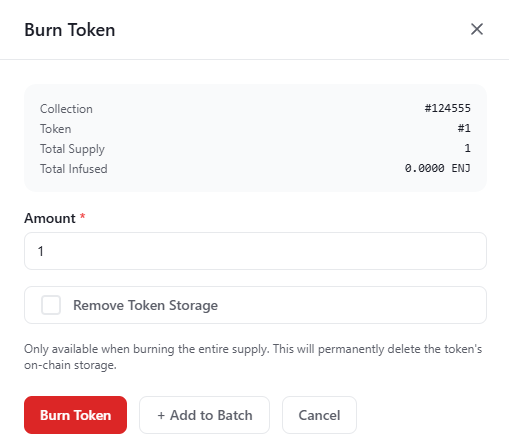
Insert the amount of tokens to melt, and click on the "Burn Token" button.
The Transaction Request will then appear in the "Transactions" menu. A Transaction Submitted modal appears with the new transaction's UUID and a View Transaction button that opens its row on the Transactions page.
Since this request requires a Transaction
, it must be signed before it broadcasts.- By default, transactions are signed automatically by the Wallet Daemon.
- To sign with a different account, expand Transaction Options → Signing Account on the form and provide a Managed Wallet address.
Destroying a token and removing it from the Blockchain
- The caller is the collection owner
- The token has no attributes
- If the token has attributes, you can remove the attributes by clicking the 3 vertical dots (⋮) next to the token, followed by "Remove Attribute", selecting the attribute to remove and submitting the transaction. This needs to be done for all attributes.
- The token has 0 supply
- If the token has supply, you can follow the above guide Burning token's supply to remove all token supply (as long as you own all of the token's supply) Note - you can remove the supply and destroy the token in the same melt transaction.
Melting a token and destroying it are two different actions. The action demonstrated above is the action of melting a token, which decreases it's circulating supply. While destroying a token removes the token from the blockchain, and retrieves the Storage Deposit
to the collection owner.To destroy a token, follow the above instructions for Melting a token, but make sure to tick the Remove Token Storage checkbox.
Destroying a collection
- The caller is the collection owner
- The collection has no attributes
- If the collection has attributes, you can remove the attributes by clicking the 3 vertical dots (⋮) next to the collection, followed by "Remove Attribute", selecting the attribute to remove and submitting the transaction. This needs to be done for all attributes.
- The collection has 0 tokens in storage
- If the collection has some tokens, you can follow the above guide Destroying a token and removing it from the Blockchain for each of the tokens in the collection, to destroy them all.
In the Platform menu, navigate to "Collections", locate the collection you wish to destroy, click the 3 vertical dots (⋮) on its row, then click "Destroy Collection".
Confirm by clicking the "Destroy Collection" button.
A Transaction Submitted modal appears with the new transaction's UUID and a View Transaction button that opens its row on the Transactions page.
Since this request requires a Transaction
, it must be signed before it broadcasts.- By default, transactions are signed automatically by the Wallet Daemon.
- To sign with a different account, expand Transaction Options → Signing Account on the form and provide a Managed Wallet address.
Option B. Using the Enjin API & SDKs
Burning is the burnToken discriminator action on CreateTransaction. The same action handles both "melt some supply" and "destroy the token entirely" — set removeTokenStorage: true to destroy.
The C++ examples on this page target an older version of the Enjin Platform and won't work against the current API. An updated C++ SDK is on the way — for now, use the C# SDK or the GraphQL examples.
Melting token's supply
- GraphQL
- cURL
- c# SDK
- C++ SDK
- Javascript
- Node.js
- Python
mutation BurnToken {
  CreateTransaction(
    network: ENJIN  # or CANARY for testnet
    chain: MATRIX
    transaction: {
      burnToken: {
        collectionId: 68844
        tokenId: 0
        amount: 1
        removeTokenStorage: false  # set true to also destroy the token (see below)
      }
    }
  ) {
    uuid
    action
    state
  }
}
curl --location 'https://platform.enjin.io/graphql' \
-H 'Content-Type: application/json' \
-H 'Authorization: Bearer YOUR_API_TOKEN' \
-d '{"query":"mutation BurnToken($collectionId: BigInt!, $tokenId: BigInt!, $amount: BigInt!) {\r\n  CreateTransaction(\r\n    network: ENJIN\r\n    chain: MATRIX\r\n    transaction: { burnToken: { collectionId: $collectionId, tokenId: $tokenId, amount: $amount, removeTokenStorage: false } }\r\n  ) {\r\n    uuid\r\n    action\r\n    state\r\n  }\r\n}","variables":{"collectionId":68844,"tokenId":0,"amount":1}}'
using System;
using Enjin.Platform.Sdk;

// Create and authenticate the client
using var client = new PlatformClient();
client.Auth("<your-platform-token>");

// Build the CreateTransaction mutation (one action set on TransactionInput)
var mutation = new MutationQueryBuilder()
    .WithCreateTransaction(
        new TransactionQueryBuilder().WithUuid().WithState(),
        network: Network.Enjin, // or Network.Canary for testnet
        chain: Chain.Matrix,
        transaction: new TransactionInput
        {
            BurnToken = new BurnTokenInput
            {
                CollectionId = 68844,
                TokenId = 0,
                Amount = 1,
                RemoveTokenStorage = false, // set true to also destroy the token (see below)
            },
        });

var response = await client.SendMutation(mutation);
Console.WriteLine(response.Result.Data?.CreateTransaction?.Uuid);
Snippet In Progress
fetch('https://platform.enjin.io/graphql', {
  method: 'POST',
  headers: {'Content-Type': 'application/json','Authorization': 'Bearer YOUR_API_TOKEN'},
  body: JSON.stringify({
    query: `
      mutation BurnToken($collectionId: BigInt!, $tokenId: BigInt!, $amount: BigInt!) {
        CreateTransaction(
          network: ENJIN
          chain: MATRIX
          transaction: {
            burnToken: {
              collectionId: $collectionId
              tokenId: $tokenId
              amount: $amount
              removeTokenStorage: false
            }
          }
        ) {
          uuid
          action
          state
        }
      }
    `,
    variables: { collectionId: 68844, tokenId: 0, amount: 1 }
  }),
})
.then(response => response.json())
.then(data => console.log(data));
const axios = require('axios');

axios.post('https://platform.enjin.io/graphql', {
  query: `
    mutation BurnToken($collectionId: BigInt!, $tokenId: BigInt!, $amount: BigInt!) {
      CreateTransaction(
        network: ENJIN
        chain: MATRIX
        transaction: {
          burnToken: {
            collectionId: $collectionId
            tokenId: $tokenId
            amount: $amount
            removeTokenStorage: false
          }
        }
      ) {
        uuid
        action
        state
      }
    }
  `,
  variables: { collectionId: 68844, tokenId: 0, amount: 1 }
}, {
  headers: {'Content-Type': 'application/json','Authorization': 'Bearer YOUR_API_TOKEN'}
})
.then(response => console.log(response.data))
.catch(error => console.error(error));
import requests

query = '''
mutation BurnToken($collectionId: BigInt!, $tokenId: BigInt!, $amount: BigInt!) {
  CreateTransaction(
    network: ENJIN
    chain: MATRIX
    transaction: {
      burnToken: {
        collectionId: $collectionId
        tokenId: $tokenId
        amount: $amount
        removeTokenStorage: false
      }
    }
  ) {
    uuid
    action
    state
  }
}
'''

variables = {'collectionId': 68844, 'tokenId': 0, 'amount': 1}

response = requests.post('https://platform.enjin.io/graphql',
  json={'query': query, 'variables': variables},
  headers={'Content-Type': 'application/json', 'Authorization': 'Bearer YOUR_API_TOKEN'}
)
print(response.json())
Once the transaction is executed, the token supply will be burned.
Destroying a token and removing it from the Blockchain
- The caller is the collection owner
- The token has no attributes
- If the token has attributes, they can be removed using the
removeAllTokenAttributesaction (see Adding Metadata).
- If the token has attributes, they can be removed using the
- The token has 0 supply
- You can remove the supply and destroy the token in the same
burnTokentransaction.
- You can remove the supply and destroy the token in the same
Use the same burnToken action and set removeTokenStorage: true:
- GraphQL
- cURL
- c# SDK
- C++ SDK
- Javascript
- Node.js
- Python
mutation DestroyToken {
  CreateTransaction(
    network: ENJIN  # or CANARY for testnet
    chain: MATRIX
    transaction: {
      burnToken: {
        collectionId: 68844
        tokenId: 0
        amount: 1
        removeTokenStorage: true
      }
    }
  ) {
    uuid
    action
    state
  }
}
curl --location 'https://platform.enjin.io/graphql' \
-H 'Content-Type: application/json' \
-H 'Authorization: Bearer YOUR_API_TOKEN' \
-d '{"query":"mutation DestroyToken($collectionId: BigInt!, $tokenId: BigInt!, $amount: BigInt!) {\r\n  CreateTransaction(\r\n    network: ENJIN\r\n    chain: MATRIX\r\n    transaction: { burnToken: { collectionId: $collectionId, tokenId: $tokenId, amount: $amount, removeTokenStorage: true } }\r\n  ) {\r\n    uuid\r\n    action\r\n    state\r\n  }\r\n}","variables":{"collectionId":68844,"tokenId":0,"amount":1}}'
using System;
using Enjin.Platform.Sdk;

// Create and authenticate the client
using var client = new PlatformClient();
client.Auth("<your-platform-token>");

// Build the CreateTransaction mutation (one action set on TransactionInput)
var mutation = new MutationQueryBuilder()
    .WithCreateTransaction(
        new TransactionQueryBuilder().WithUuid().WithState(),
        network: Network.Enjin, // or Network.Canary for testnet
        chain: Chain.Matrix,
        transaction: new TransactionInput
        {
            BurnToken = new BurnTokenInput
            {
                CollectionId = 68844,
                TokenId = 0,
                Amount = 1,
                RemoveTokenStorage = true, // also destroy the token
            },
        });

var response = await client.SendMutation(mutation);
Console.WriteLine(response.Result.Data?.CreateTransaction?.Uuid);
Snippet In Progress
fetch('https://platform.enjin.io/graphql', {
  method: 'POST',
  headers: {'Content-Type': 'application/json','Authorization': 'Bearer YOUR_API_TOKEN'},
  body: JSON.stringify({
    query: `
      mutation DestroyToken($collectionId: BigInt!, $tokenId: BigInt!, $amount: BigInt!) {
        CreateTransaction(
          network: ENJIN
          chain: MATRIX
          transaction: {
            burnToken: {
              collectionId: $collectionId
              tokenId: $tokenId
              amount: $amount
              removeTokenStorage: true
            }
          }
        ) {
          uuid
          action
          state
        }
      }
    `,
    variables: { collectionId: 68844, tokenId: 0, amount: 1 }
  }),
})
.then(response => response.json())
.then(data => console.log(data));
const axios = require('axios');

axios.post('https://platform.enjin.io/graphql', {
  query: `
    mutation DestroyToken($collectionId: BigInt!, $tokenId: BigInt!, $amount: BigInt!) {
      CreateTransaction(
        network: ENJIN
        chain: MATRIX
        transaction: {
          burnToken: {
            collectionId: $collectionId
            tokenId: $tokenId
            amount: $amount
            removeTokenStorage: true
          }
        }
      ) {
        uuid
        action
        state
      }
    }
  `,
  variables: { collectionId: 68844, tokenId: 0, amount: 1 }
}, {
  headers: {'Content-Type': 'application/json','Authorization': 'Bearer YOUR_API_TOKEN'}
})
.then(response => console.log(response.data))
.catch(error => console.error(error));
import requests

query = '''
mutation DestroyToken($collectionId: BigInt!, $tokenId: BigInt!, $amount: BigInt!) {
  CreateTransaction(
    network: ENJIN
    chain: MATRIX
    transaction: {
      burnToken: {
        collectionId: $collectionId
        tokenId: $tokenId
        amount: $amount
        removeTokenStorage: true
      }
    }
  ) {
    uuid
    action
    state
  }
}
'''

variables = {'collectionId': 68844, 'tokenId': 0, 'amount': 1}

response = requests.post('https://platform.enjin.io/graphql',
  json={'query': query, 'variables': variables},
  headers={'Content-Type': 'application/json', 'Authorization': 'Bearer YOUR_API_TOKEN'}
)
print(response.json())
Once the transaction is executed, the token will be destroyed and the Storage Deposit
will be retrieved.Destroying a collection
- The caller is the collection owner
- The collection has no attributes
- If the collection has attributes, they can be removed using the
removeAllCollectionAttributesaction (see Adding Metadata).
- If the collection has attributes, they can be removed using the
- The collection has 0 tokens in storage
- If the collection has some tokens, follow the above instructions for Destroying a token for each of the tokens in the collection, to destroy them all.
Destroying a collection is the destroyCollection discriminator action on CreateTransaction. Pass the collection ID as id:
- GraphQL
- cURL
- c# SDK
- C++ SDK
- Javascript
- Node.js
- Python
mutation DestroyCollection {
  CreateTransaction(
    network: ENJIN  # or CANARY for testnet
    chain: MATRIX
    transaction: {
      destroyCollection: {
        id: 68844
      }
    }
  ) {
    uuid
    action
    state
  }
}
curl --location 'https://platform.enjin.io/graphql' \
-H 'Content-Type: application/json' \
-H 'Authorization: Bearer YOUR_API_TOKEN' \
-d '{"query":"mutation DestroyCollection($id: BigInt!) {\r\n  CreateTransaction(\r\n    network: ENJIN\r\n    chain: MATRIX\r\n    transaction: { destroyCollection: { id: $id } }\r\n  ) {\r\n    uuid\r\n    action\r\n    state\r\n  }\r\n}","variables":{"id":68844}}'
using System;
using Enjin.Platform.Sdk;

// Create and authenticate the client
using var client = new PlatformClient();
client.Auth("<your-platform-token>");

// Build the CreateTransaction mutation (one action set on TransactionInput)
var mutation = new MutationQueryBuilder()
    .WithCreateTransaction(
        new TransactionQueryBuilder().WithUuid().WithState(),
        network: Network.Enjin, // or Network.Canary for testnet
        chain: Chain.Matrix,
        transaction: new TransactionInput
        {
            DestroyCollection = new DestroyCollectionInput
            {
                Id = 68844, // the collection id
            },
        });

var response = await client.SendMutation(mutation);
Console.WriteLine(response.Result.Data?.CreateTransaction?.Uuid);
Snippet In Progress
fetch('https://platform.enjin.io/graphql', {
  method: 'POST',
  headers: {'Content-Type': 'application/json','Authorization': 'Bearer YOUR_API_TOKEN'},
  body: JSON.stringify({
    query: `
      mutation DestroyCollection($id: BigInt!) {
        CreateTransaction(
          network: ENJIN
          chain: MATRIX
          transaction: {
            destroyCollection: { id: $id }
          }
        ) {
          uuid
          action
          state
        }
      }
    `,
    variables: { id: 68844 }
  }),
})
.then(response => response.json())
.then(data => console.log(data));
const axios = require('axios');

axios.post('https://platform.enjin.io/graphql', {
  query: `
    mutation DestroyCollection($id: BigInt!) {
      CreateTransaction(
        network: ENJIN
        chain: MATRIX
        transaction: {
          destroyCollection: { id: $id }
        }
      ) {
        uuid
        action
        state
      }
    }
  `,
  variables: { id: 68844 }
}, {
  headers: {'Content-Type': 'application/json','Authorization': 'Bearer YOUR_API_TOKEN'}
})
.then(response => console.log(response.data))
.catch(error => console.error(error));
import requests

query = '''
mutation DestroyCollection($id: BigInt!) {
  CreateTransaction(
    network: ENJIN
    chain: MATRIX
    transaction: {
      destroyCollection: { id: $id }
    }
  ) {
    uuid
    action
    state
  }
}
'''

variables = {'id': 68844}

response = requests.post('https://platform.enjin.io/graphql',
  json={'query': query, 'variables': variables},
  headers={'Content-Type': 'application/json', 'Authorization': 'Bearer YOUR_API_TOKEN'}
)
print(response.json())
Once the transaction is executed, the collection will be destroyed and the Storage Deposit
will be retrieved.For each of the burn / destroy actions on this page, an event is emitted once the transaction reaches FINALIZED — useful as a confirmation signal. See Working with Events for how to read it.